BDD Coverage Agent for Jira
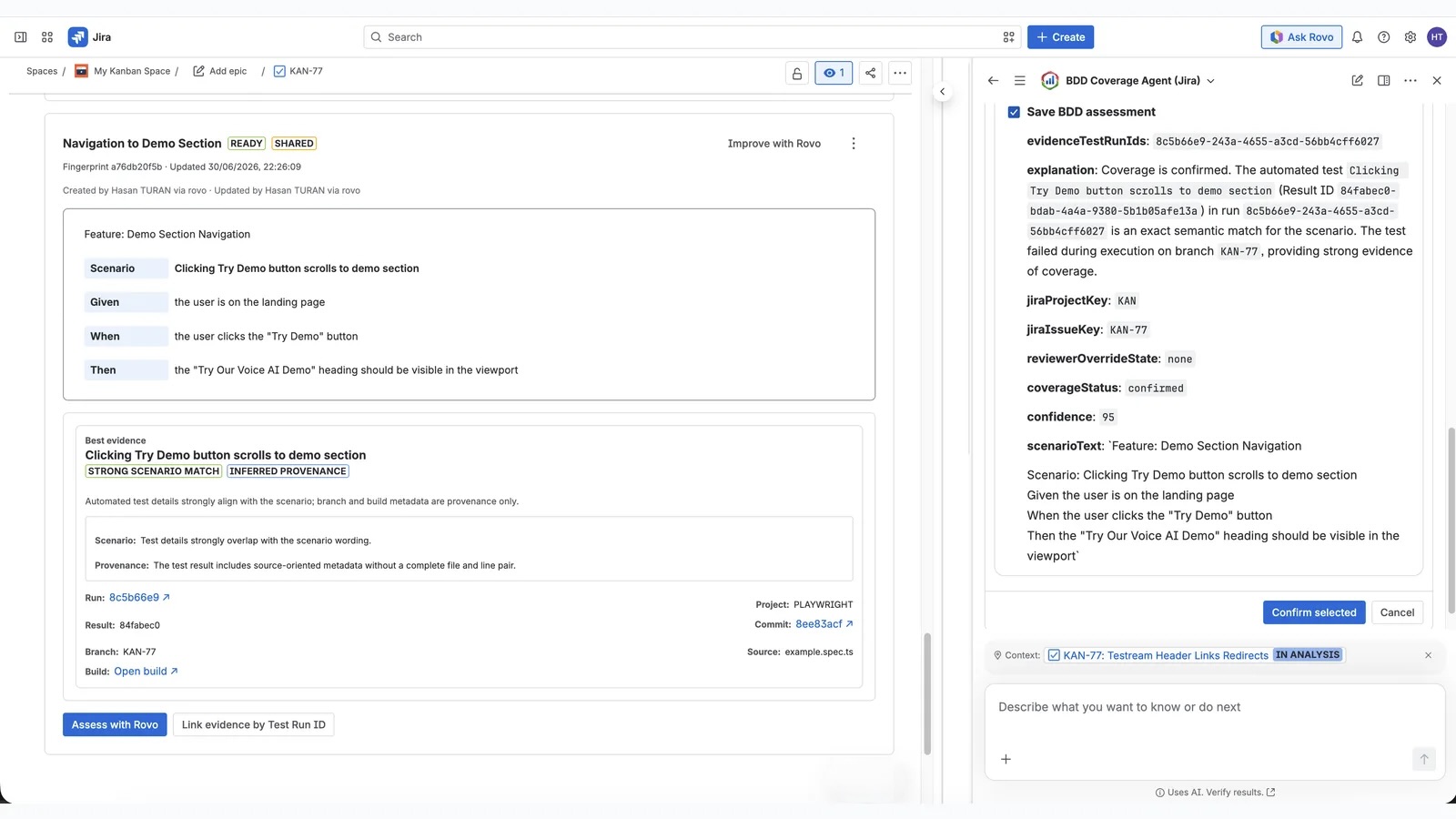
Testream's BDD Coverage Agent for Jira assesses whether captured automated test evidence supports a saved Jira BDD scenario. It compares the scenario's extracted Gherkin clauses with linked Testream evidence, then returns a Confirmed, Likely, Not covered, Insufficient evidence, or Conflicting evidence assessment with confidence, rationale, provenance, and reviewer control.
This is an evidence-review workflow, not a claim that a passing test automatically proves a behavior is covered.
What does the agent assess?
The agent compares the scenario's extracted Gherkin clauses with the test evidence available to Testream. The result helps a reviewer answer:
Does the captured test evidence support this behavior, and how strong is that connection?
It can surface:
- A coverage status: Confirmed, Likely, Not covered, Insufficient evidence, or Conflicting evidence.
- A confidence level and plain-language rationale.
- The matched test evidence and provenance behind the assessment.
- Gaps that need a new or better-mapped test.
What evidence can inform the assessment?
The bounded assessment uses candidate details such as:
| Candidate detail | How it supports the assessment |
|---|---|
| Test name, suite or framework, outcome | Connects a candidate test to the scenario. |
| Steps | Provides behavioral detail for comparison. |
| Source location and source snippet | Adds implementation context. |
| Failure summary and attachment names | Adds result and artifact context. |
| Scenario-match and provenance details | Explains the candidate's relationship to the scenario and its run. |
Before you start
You need:
- Testream installed in the Jira project.
- At least one captured automated run with usable test names, steps, or metadata.
- A BDD scenario in Testream BDD Specs.
- Rovo enabled for the Jira workspace if you want the AI assessment. The underlying evidence remains useful without Rovo.
For a stronger explanation, keep scenario language specific and ensure captured tests have descriptive names, steps, source details, failure summaries, and attachment names.
Review a scenario
1. Open the BDD Specs view
Open the BDD Specs section on a Jira issue and choose a scenario to review. If the issue does not have a scenario yet, draft or refine one with Rovo.
2. Run the coverage assessment
Ask the BDD Coverage Agent to assess the scenario. Testream provides the available scenario context and captured evidence to the assessment workflow.
3. Inspect the explanation
Read the matched evidence, rationale, confidence, and provenance. Pay particular attention to the scenario clauses, test steps, outcomes, and source details; a similar test name is not by itself proof of coverage.
4. Make the reviewer decision
Approve the assessment when it matches the evidence, or reject it when the evidence is not convincing or the scenario needs changes. Edit the saved scenario and start a new assessment when it needs changes.
Understanding the result
| Status | Meaning | Recommended reviewer action |
|---|---|---|
| Confirmed | The available evidence strongly supports the scenario. | Check the cited evidence and approve it when it reflects the intended behavior. |
| Likely | The evidence appears related, but the connection is incomplete or less certain. | Review the rationale and evidence before approving. |
| Not covered | No usable evidence supports the scenario. | Add or update an automated test, then run it again before reassessing. |
| Insufficient evidence | One or more required clauses lack clear supporting evidence. | Improve the scenario or test evidence, then reassess. |
| Conflicting evidence | The available evidence supports and contradicts required clauses. | Review the competing evidence before approving. |
These statuses describe coverage mapping, not the latest execution outcome. A scenario can be well covered while its latest run fails, or pass in a run without proving the full scenario.
Evidence and reviewer control
The useful output is the combination of the assessment and the evidence behind it. Keep the following distinctions clear:
- Coverage mapping asks whether a test appears to implement a behavior.
- Execution outcome asks whether the latest captured run passed or failed.
- Release readiness combines evidence from runs, BDD behaviors, manual cycles, and Jira issue or release context.
Rovo can accelerate comparison and explanation, but reviewers remain responsible for accepting the result. Do not use an unreviewed assessment as the only release gate.
Troubleshooting weak matches
If the agent returns a low-confidence or unexpected result:
- Check that the latest run reached the correct Testream project.
- Use precise behavior language and expected outcomes in the scenario.
- Keep test names, steps, and metadata descriptive enough to establish provenance.
- Re-run the relevant tests after changing the scenario or implementation.
- Review the new evidence before confirming coverage.
Common questions
Can a passing test still produce a Not covered result?
Yes. A passing run can still be Not covered when the available evidence does not establish a meaningful connection to the saved BDD behavior or expected outcome.
Does Rovo make the final coverage decision?
No. Rovo accelerates comparison and explanation. A reviewer must approve or reject the assessment. If the scenario needs changes, edit the saved scenario and start a new assessment; an unreviewed assessment should not be the only release gate.
What should I do when no useful evidence is available?
Ingest a run that references the issue or scenario behavior, improve the test's names or metadata, or link reviewer-selected evidence by Test Run ID. Reassess after the new evidence is available.
Related workflows
- BDD Specs - write issue-level Gherkin and review its evidence.
- BDD Library - reuse behaviors across issues and releases.
- Test Cycles - execute focused manual coverage from reusable behaviors.
- Release Visibility - review the evidence mix and coverage gaps for a release.
- Automated test reporting Quick Start - capture the first run.