BDD Library
Use BDD Library to manage reusable behaviors in Jira instead of rewriting the same Gherkin across multiple issues or releases.
Looking for the broader product overview first? Read BDD Jira integration.
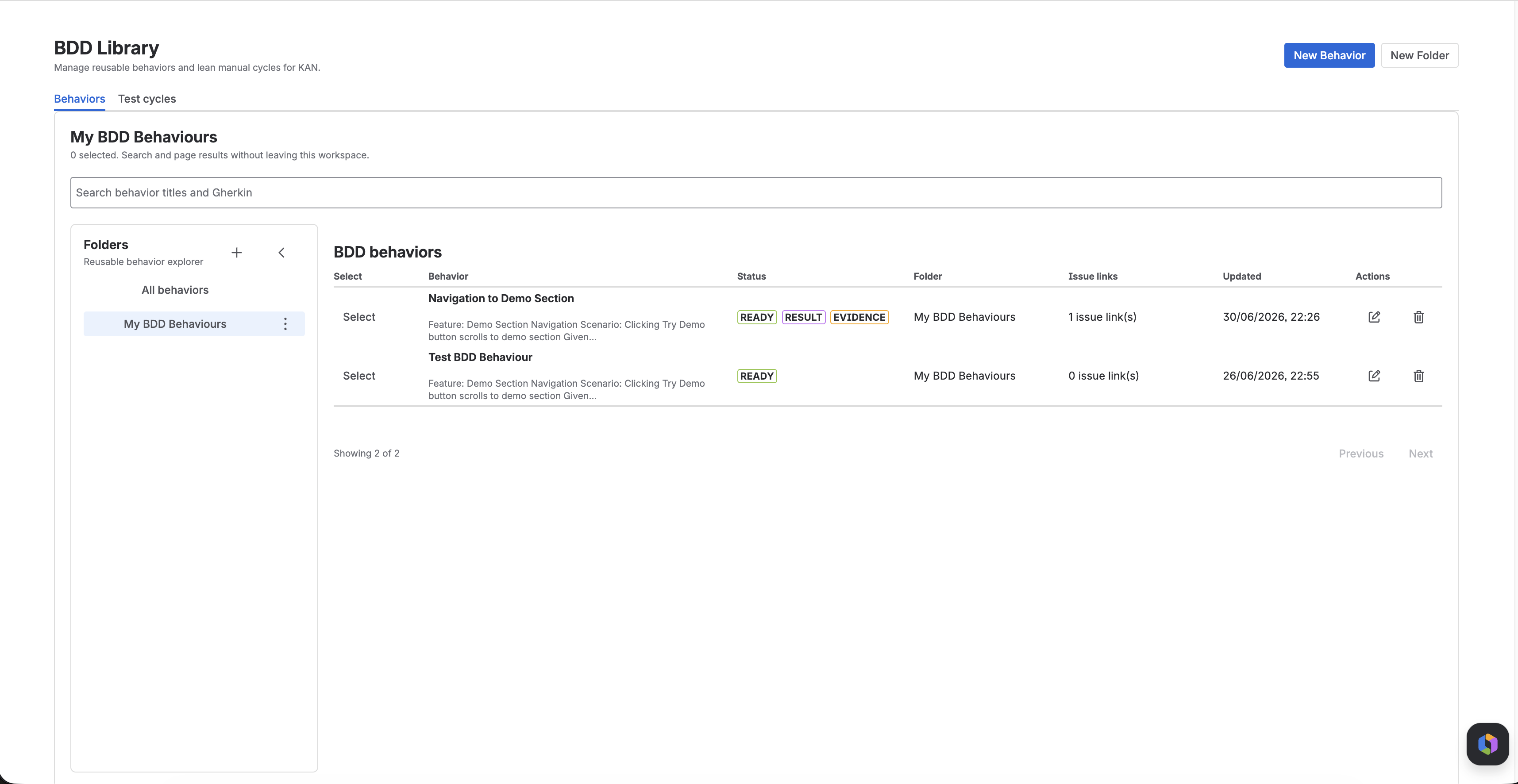
What BDD Library Stores
BDD Library stores reusable behaviors. Each behavior includes:
- A title
- One focused Gherkin scenario
- An authored status
- An optional folder
- Links to Jira issues that use the behavior
- Evidence badges that show whether the behavior already has automation, manual results, or uploaded evidence
Organize Behaviors
Use folders to group behaviors by area, team, release stream, or product workflow.
You can:
- Create folders
- Rename folders
- Delete folders when they are no longer needed
- Keep behaviors unfiled when no grouping is required
Create a Behavior
From BDD Library → Behaviors:
- Select New Behavior
- Enter a short behavior title
- Choose a folder or leave it unfiled
- Set the authored status to Draft or Ready
- Add the Gherkin body
- Save the behavior
BDD Library expects one focused scenario per behavior. In practice, that means:
- Use exactly one
ScenarioorScenario Outline - Include at least one
Given - Include at least one
When - Include at least one
Then
Scenario: Signed-in customer completes checkout
  Given a signed-in customer has items in the cart
  When checkout completes successfully
  Then an order is created
Authored Status
BDD Library uses two authored states:
| Status | Meaning |
|---|---|
| Draft | The behavior still needs refinement or review |
| Ready | The behavior is stable enough to reuse in issues, cycles, and release workflows |
Keep the status focused on authoring quality, not execution outcome.
Search and Review
The Behaviors tab lets you:
- Search behavior titles and Gherkin text
- Filter by folder
- Page through large libraries
- Review issue link count
- Review last updated time
Status badges also help you understand whether a behavior already has supporting evidence:
- Automation
- Result
- Evidence
- Shared
Reuse Behaviors Across Jira Issues
Behaviors are designed to be reused. A single behavior can be linked to more than one Jira issue when the same expected behavior matters across multiple work items.
This helps teams:
- Keep acceptance criteria consistent
- Avoid duplicating Gherkin
- Track shared evidence across related issues
- Review release coverage from one reusable behavior map
Link Existing Behaviors To A Jira Issue
BDD Library connects to the Jira issue workflow through the BDD Specs panel.
From a Jira issue:
- Open the BDD Specs panel for the issue.
- Select Link existing behavior.
- Search the behavior library for behaviors not yet linked to that issue.
- Select one or more behaviors.
- Confirm the link.
This lets teams reuse existing behaviors without copying Gherkin into each issue.
If no matching behavior appears, create it in BDD Library first, then return to the issue and link it.
How BDD Library Fits With BDD Specs
BDD Specs remain useful when a team wants issue-level drafting and Rovo-assisted scenario refinement directly in the Jira issue view.
Use BDD Library when you want:
- Reusable behaviors instead of one-off issue text
- A browsable behavior inventory
- Folder organization
- Direct issue linking through the Jira BDD Specs panel
- Selection into test cycles
- Release-level evidence rollups
Best Practices
- Keep each behavior small enough to be executed and reviewed independently.
- Prefer business-readable scenario titles over implementation details.
- Use Ready only after the behavior is stable enough to reuse.
- Reuse existing behaviors instead of cloning similar scenarios.
- Use folders only when they make retrieval easier for the team.
Related Features
Next Steps
- Create a reusable set of behaviors, then build a test cycle.
- Link those behaviors to release work and review release visibility.
- Review BDD Jira integration for the broader workflow overview.