Introduction
Welcome to Testream, release evidence for Jira teams that already run tests in code and CI. Testream keeps the run, behavior, issue, cycle, and release context together so reviewers can see what passed, what failed, and what still needs validation.
Testream connects the tests you already run to the Jira issues and releases where decisions happen. Start with one reporter and one real run, then add reusable BDD workflows, manual Test Cycles, and release visibility as your team needs them.
Choose your path
| If you want to… | Start here |
|---|---|
| Publish your first automated run | Quick Start |
| Choose a framework reporter | Installation and reporter guides |
| Get guided setup in Jira | Rovo Setup Agent |
| Map BDD behavior to test evidence | BDD Coverage Agent |
| Run focused manual coverage | Test Cycles |
| Review evidence for a release | Release Visibility |
What is Testream?
Testream publishes automated test results into Jira with the context teams need to understand delivery risk:
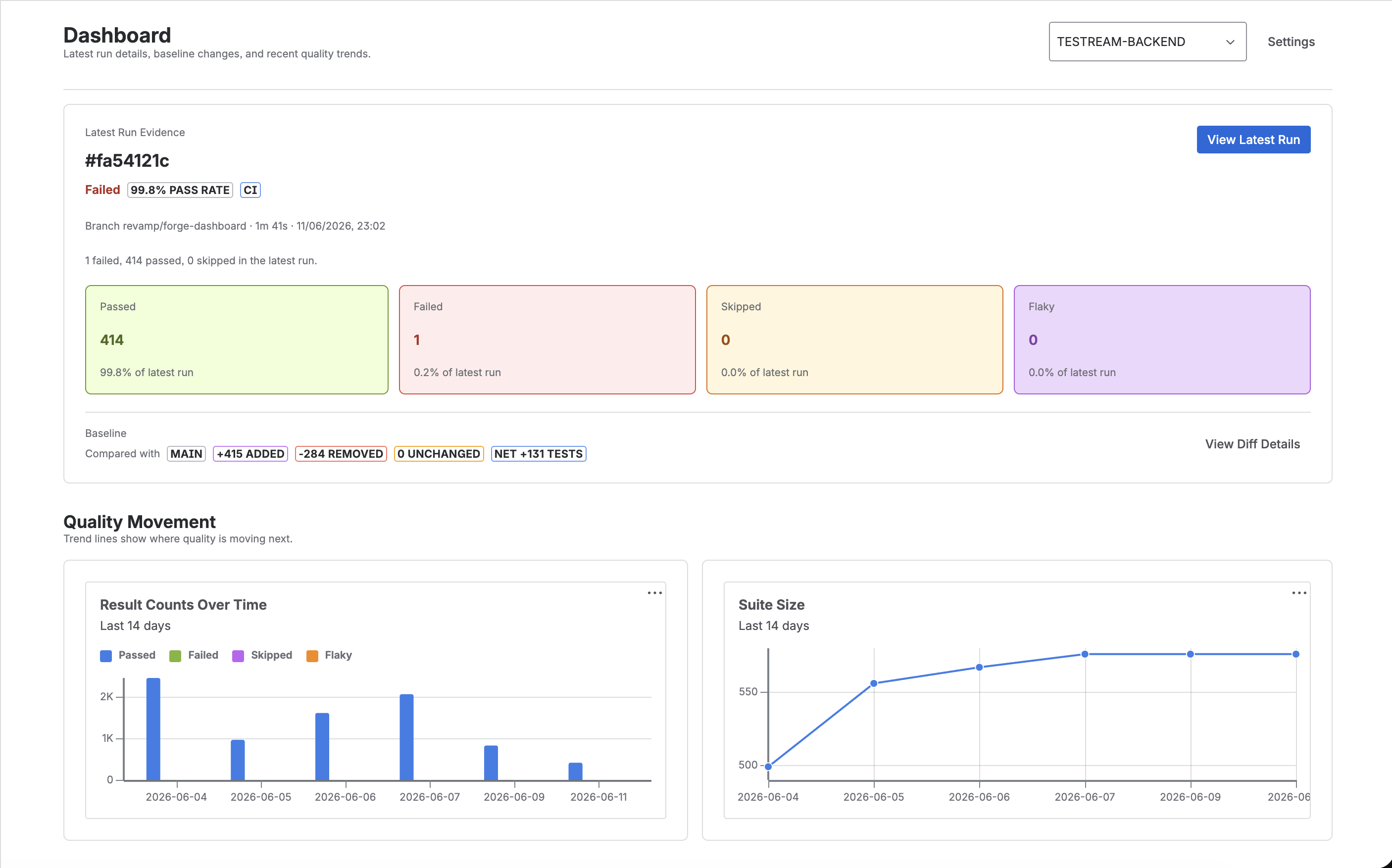
- Jira-native run summaries - See pass rate, failed tests, branch, commit, and suite changes where work is already tracked.
- Failure evidence - Keep errors, stack traces, screenshots, videos, traces, logs, and metadata connected to the result.
- CI/CD context - Attach branch, commit, environment, and run metadata from local runs or pipelines.
- Run history and release context - Track flaky behavior, suite growth, timing changes, and linked release evidence over time.
- Reusable BDD workflows - Manage shared behaviors, manual cycles, and release evidence without duplicating acceptance criteria.
- Code-first reporting - Start from the automated tests you already run, not from a separate manual test-case inventory.
- Shared review context - Give developers, QA, product, and release teams the run status, failure details, artifacts, and coverage gaps in Jira.
Key Features
Multi-Framework Support
Testream supports the following reporters out of the box:
- Playwright - E2E testing for modern web apps
- .NET - xUnit, NUnit, MSTest, and TRX formats
- Cypress - E2E testing for web applications
- Jest - Unit and integration testing for JavaScript/TypeScript
- Jasmine - Jasmine 5 testing with source locations and run metadata
- WebdriverIO - E2E testing for web applications
- Mocha - Flexible JavaScript test framework
- CLI - Upload CTRF reports from any test tool
- JUnit - Parse and upload JUnit XML test results
- Vitest - Blazing-fast unit testing for Vite projects
- pytest - Python testing framework with rich plugin ecosystem
- Go - Go test runs with CTRF, source locations, and CI context
CTRF Standard
All reporters use the Common Test Report Format (CTRF) - an open standard for test result reporting. This ensures consistency and interoperability across different testing tools.
CI/CD Integration
Upload test results and artifacts from local runs or any stage of your pipeline. Whether you use GitHub Actions, Jenkins, CircleCI, Azure DevOps, or another CI/CD provider, Testream reporters and the CLI can publish results with TESTREAM_API_KEY:
npx @testream/cli \
  --report-path ctrf/ctrf-report.json \
  --test-tool playwright \
  --api-key $TESTREAM_API_KEY
Testream for Jira
Install the Testream – Automated Test Management for Jira app to make automated test evidence visible inside Jira:
- Test Run Summaries in Jira Issues - View summaries of test runs directly within Jira issues.
- Test Suite Changes - Track tests added, removed, and unchanged between runs on the same branch.
- Rovo-assisted setup - Let the Testream Setup Agent recommend reporters, CI guidance, and first-run checks from Jira.
- BDD Coverage Agent - Assess Jira BDD scenarios against captured evidence with confidence, rationale, and provenance while keeping reviewers in control.
- BDD Library - Reuse behaviors across Jira issues, cycles, and releases.
- Test cycles - Execute lean manual coverage from reusable behaviors.
- Detailed test runs - View results with branch, commit, and environment metadata
- Create issues from failures - One-click bug creation with pre-filled context
- Rich debugging artifacts - Screenshots, videos, and trace files inline
- Trends & analytics - Track test performance over time
- Release management - Filter and assess quality by release version
- Release Visibility - Review linked runs, behavior coverage, cycle outcomes, and unmapped work before the release review
- PDF reports - Generate downloadable PDF summaries of test runs
- Test health metrics - Pass rate, failed tests, and flaky test detection
Learn more about the Jira integration | Explore automated evidence | Explore BDD coverage
Getting Started
The fastest proof is one real automated run in Jira:
- Quick Start - Publish your first automated test run into Jira
- Installation Guide - Choose the reporter for your framework
- Rovo Setup Agent - Let the Testream Setup Agent guide reporter and CI setup
- CLI Reporter - Upload CTRF or converted reports from any test tool
Need Help?
- Email: contact@testream.app
- Website: testream.app