Test Cycles
Use Test Cycles to execute reusable BDD Library behaviors as lean manual test runs inside Jira.
Test cycles are not a separate test-case authoring system. They are execution batches built from behaviors you already maintain in BDD Library.
What Test Cycles Are For
Use test cycles when your team wants to:
- Group behaviors for a release or milestone
- Execute manual checks without rewriting acceptance criteria
- Capture pass, fail, blocked, or skipped outcomes per behavior
- Add notes and evidence to each executed result
- Track progress across a shared execution batch
When a cycle is linked to a release, it becomes part of the broader release workflow for the Jira issues in that version. That is especially useful when those issues already have BDD specs created manually or with Rovo, because those release-scoped specs are part of the cycle context as well instead of forcing a separate manual test inventory.
Create a Cycle
You can create a cycle in two ways:
Create from selected behaviors
- Open BDD Library → Behaviors
- Select one or more behaviors
- Choose Create cycle from selection
- Name the cycle
- Optionally link a Jira release
- Optionally set an environment name
- Save the cycle
This path creates the cycle with those selected behaviors already attached.
Create an empty cycle
- Open BDD Library → Test cycles
- Select New empty cycle
- Enter the cycle name
- Optionally link a Jira release
- Optionally set an environment name
- Save the cycle
Then:
- Open the new cycle
- Select Add behaviors in cycle detail
- Search the library and select the behaviors to add
Empty cycles are useful when you want to define the shell first and then fill it from cycle detail. The add-behaviors flow searches the library directly, so you do not need to depend on a previous selection from the Behaviors tab.
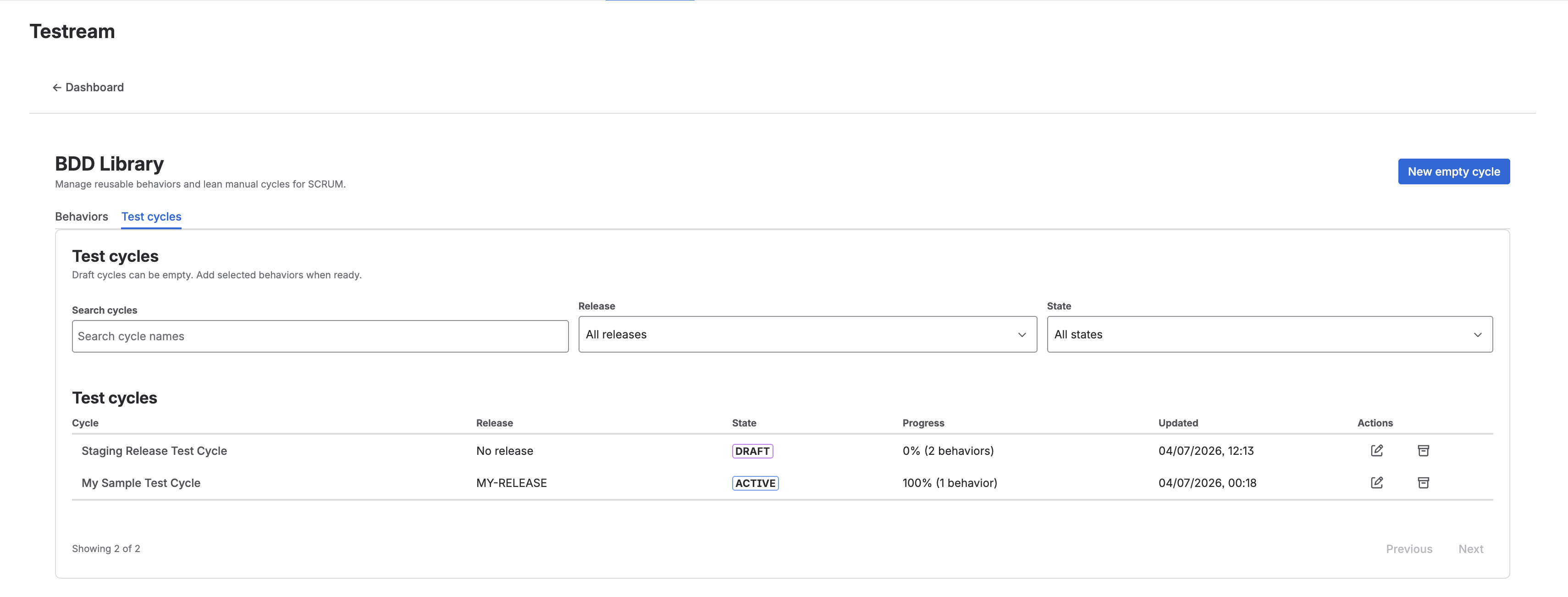
Cycle States
| State | Meaning |
|---|---|
| Draft | The cycle is being prepared |
| Active | The cycle is being executed |
| Completed | Execution is finished and the cycle is read-only |
| Archived | The cycle is closed and no longer active |
Completed and archived cycles are read-only for execution changes, notes, and evidence updates.
In practice:
- Draft and Active cycles can still be updated
- Completed and Archived cycles cannot be modified
- The edit flow allows changing the cycle state up to Completed
- Archiving is handled as a separate closeout action
Filter and Find Cycles
The Test Cycles list supports:
- Search by cycle name
- Filter by linked release
- Filter by state
- Pagination for larger cycle lists
Each cycle row shows:
- Cycle name
- Linked release
- State
- Progress percentage
- Total behavior count
- Last updated time
Execute Cycle Behaviors
Open a cycle to enter the cycle details and execute the behaviors in that batch.
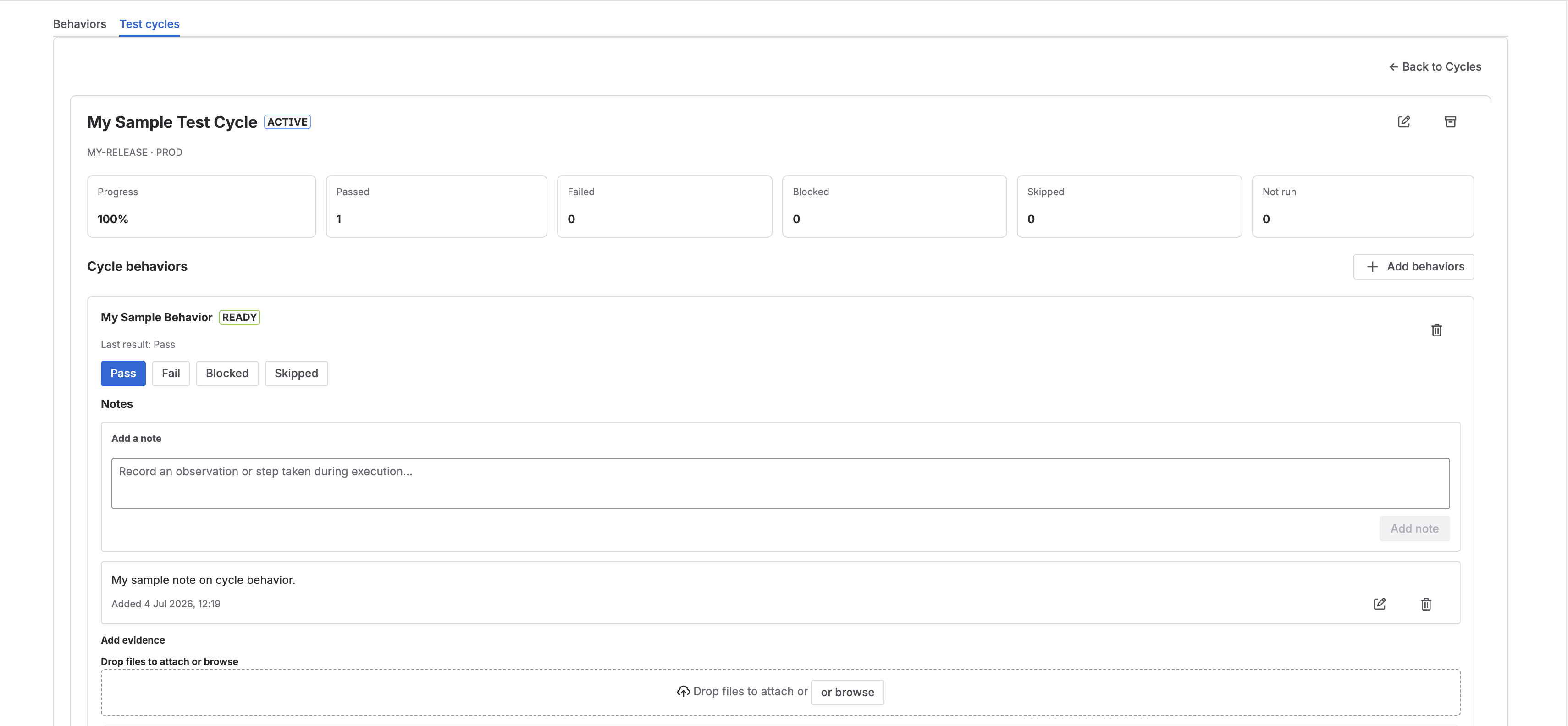
For each behavior in the cycle, you can record one of these manual execution statuses:
- Passed
- Failed
- Blocked
- Skipped
Each cycle item also carries the same authored and evidence badges that appear in BDD Library:
- Draft or Ready authored status
- Automation badge when automation is linked
- Result badge when a manual result exists
- Evidence badge when manual evidence has been uploaded
The cycle summary updates as results are recorded, including:
- Progress
- Passed
- Failed
- Blocked
- Skipped
- Not run
If a behavior has not been executed yet, the cycle detail shows No manual result yet.
Add or Remove Behaviors
Cycles stay flexible while they are still editable.
From cycle detail you can:
- Add more behaviors from the library
- Remove behaviors that no longer belong in the execution batch
This makes it easy to start with a small set and expand the cycle only when needed.
Notes and Evidence
After a behavior has a manual result, you can add supporting execution context:
- Notes for what was tested, observed, or deferred
- Uploaded evidence files
- Image thumbnails for visual proof
- File links for non-image artifacts
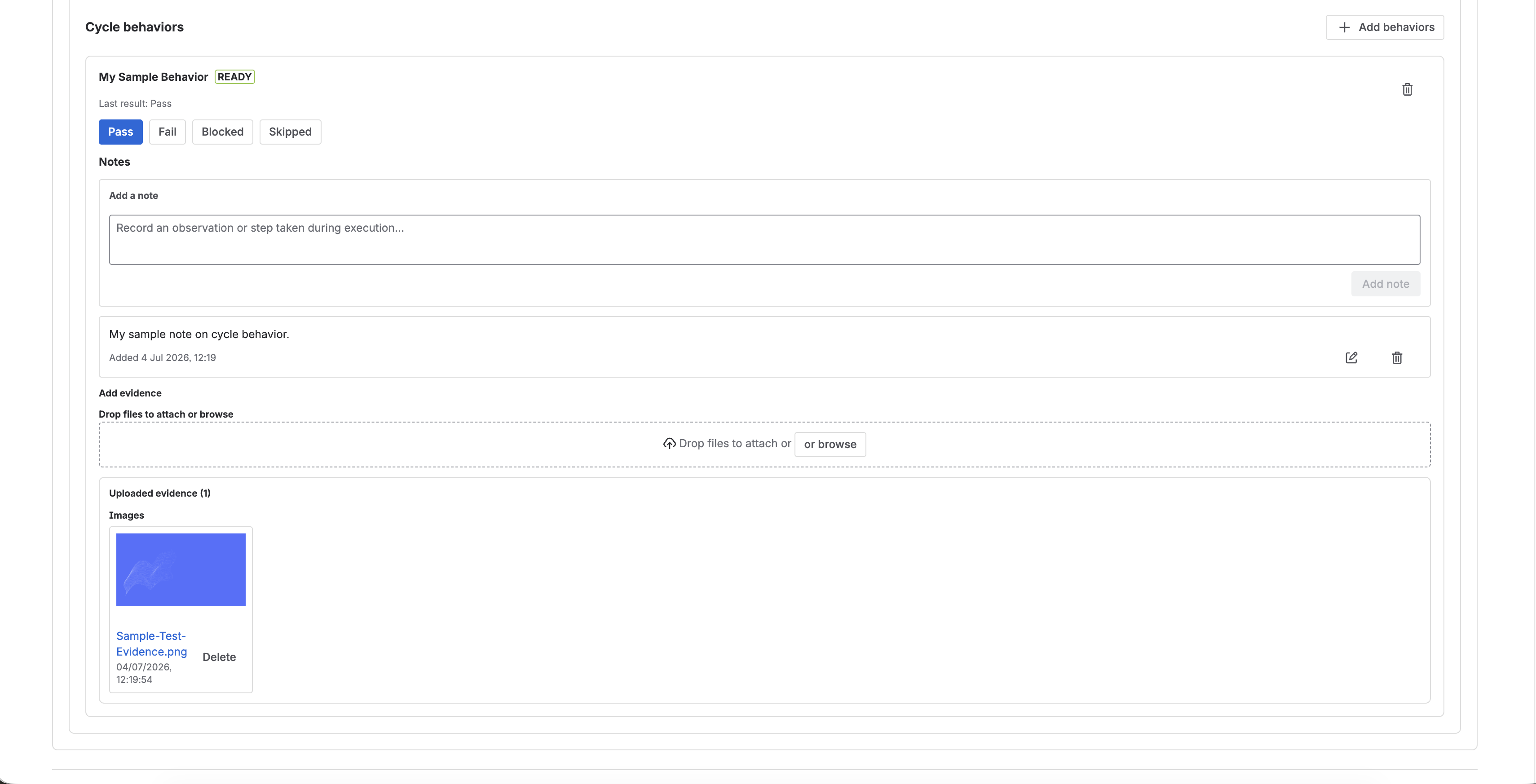
Use this to keep screenshots, logs, exports, or reviewer comments attached to the specific executed behavior rather than to a general release note.
Notes and evidence are attached at the behavior result level, not at the cycle header level.
Link Cycles to Releases
Cycles can be linked to Jira releases. When they are linked:
- They appear in release-level readiness workflows
- They show up in the Releases page and in linked release evidence views
- Their progress contributes context for release decision-making
Release-linked cycles are useful when your Jira issues for that version already carry BDD specs created manually or with Rovo. Once the cycle is attached to that release, those release-scoped specs are also part of the cycle context, and the cycle provides the manual execution and evidence layer around that same release scope.
Best Practices
- Build cycles from reusable behaviors instead of rewriting scenarios.
- Keep each cycle narrow enough for one release, environment, or execution window.
- Move cycles to Completed only when manual execution is finished.
- Archive cycles when they should no longer be actively managed.
- Attach evidence at the behavior result level so later reviewers can see what actually happened.
- Use environment names when the execution context matters.
Related Features
Next Steps
- Create or refine reusable behaviors in BDD Library.
- Link a cycle to a release and review release visibility.
- Compare cycle execution with automated evidence in Test Run Details.